
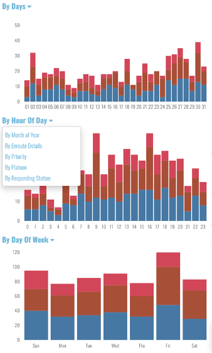
The three graphs to the right of the accordions break down data according to the actively selected accordion. The type of data shown in a graph can be changed by selecting the dropdown menu in the graph. The topmost chart is dedicated to time options (days, weeks, months, etc.). The others allow dimensions such as priority and responding station. Bars in these graphs can be clicked/dragged upon to include/exclude data.
Customization Options
If there is some other dimension you’re interested in seeing as a dropdown option, let us know. If you’ve sent us the data, there’s a good chance it can be added here.