
The Time Intervals tab allows you to see the seconds between important response timestamps based on any filters you may apply.
Here are a few commonly asked questions about this tab:
Q: Why does the total time interval in the top left seem so high?
A: Depending on your implementation, you may have time intervals that overlap available for selection (for example, the Pre-arrival interval is composed of Alarm Handling, Turnout, and Travel intervals). If overlapping timestamps are selected, the time shown in the top left will be calculated from the combination of all the time intervals selected.
Q: Why don't the time intervals neatly add up?
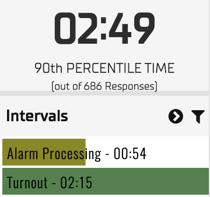
A: This is because the 90th percentile in the top left is calculated using the combination of all time intervals, whereas the 90th percentile for the intervals uses only that interval. The data that determines a 90th percentile for a individual interval may have a different impact on a combined time interval when all the other intervals are considered in the calculation. Additionally, some responses may have nulls in a given time interval while another interval on the same response is used in a calculation.
Q: Why are the time intervals in this tab different than the intervals in HQ?
A: Depending on your implementation, data may be included in either Diagnostics or HQ differently. In this tab, data is generally only included if it's part of a total response to an emergent event. Data included in HQ may be looking at data even if it is not apart of a total response (for example, HQ may include the turnout of a response that was cancelled en route, whereas the Time Intervals tab will not).
Talk to your analyst if you have questions about what data is included in either app.