
Call concurrency refers to the number of incidents occurring simultaneously in an agency’s response area within a given period.
Call concurrency is typically used to understand how simultaneous demand may impact an agency’s ability to respond effectively, either agency-wide, within specific areas, or for specific incident types.
We measure call concurrency by looking at each incident an agency responds to, and asking, at the time the incident started, how many other incidents were in progress? We can then show a distribution of the proportion of calls at each level of concurrency.
A simple example might look like this:
| Concurrency | 1 | 2 | 3 | 4 | 5 | 6 |
|---|---|---|---|---|---|---|
| Number of Calls | 1560 | 971 | 316 | 72 | 5 | 1 |
| Percentage of Calls | 53% | 33% | 11% | 2% | 0% | 0% |
Using the Call Concurrency Dashboard
The call concurrency dashboard reports an agency-wide, top-line concurrency number, a distribution of calls by concurrency level, and a breakdown of concurrency by station zone.
Agency-wide
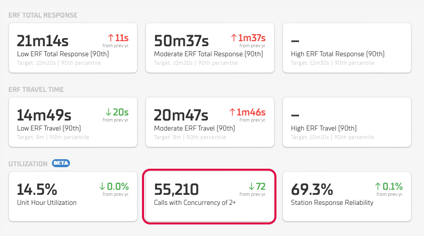
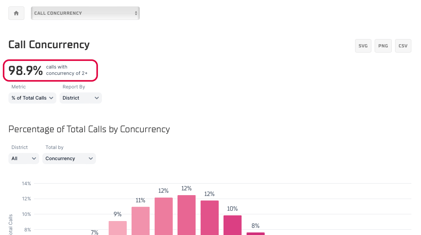
On the Call Concurrency dashboard card, and at the top of the Call Concurrency chart, you will find the top-line call concurrency (2+) Total Calls, and call Percentage respectively. Call percentage is the portion of incidents the agency responded to that began while at least one other incident was already in progress. We describe this as incidents having “concurrency of 2+”.
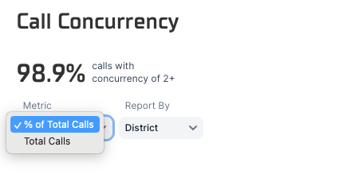
Below the top-line number, you can use the Metric menu to switch between Percentage of Total Calls and Total Calls as the primary metric. This setting affects the entire chart.
Distribution of Calls by Concurrency Level
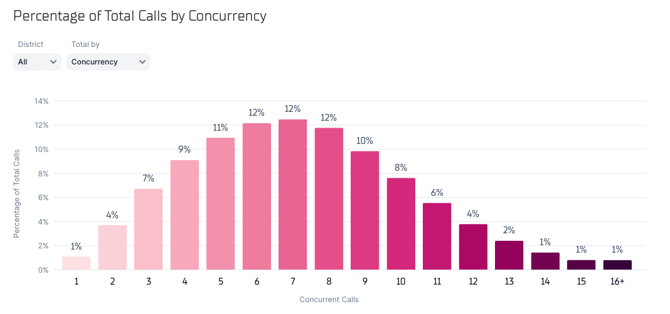
The first chart is a histogram that shows what portion of an agency’s overall call volume occurred at each level of concurrency. In the example above, the most frequent concurrency level is 7, which was the case for 12% of all calls. In other words, for 12% of calls that came in, there were exactly six other incidents already in progress.
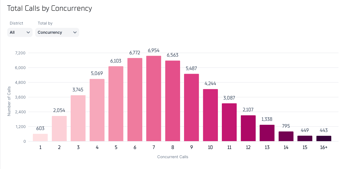
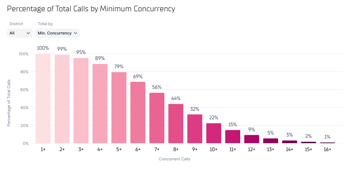
Using the Total By selection menu, the chart can also show call volume by Minimum Concurrency level. For example, the chart above shows that 22% of all calls have a concurrency level of at least 10.
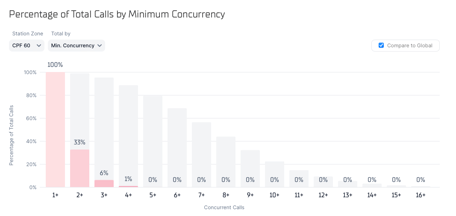
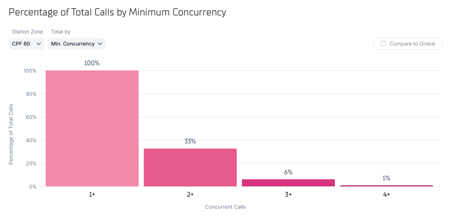
You can use the Station Zone dropdown to look at concurrency levels within a specific station zone, and see how this compares to the global call concurrency distribution.
Unchecking the Compare to Global box will show only the concurrency levels of the selected station zone, removing the global context.
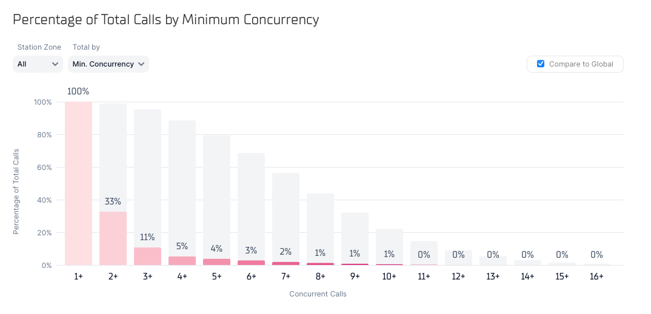
You can also apply global HQ filters to analyze concurrency for certain call types. The chart above shows that while 95% of all incidents have a concurrency of 3 or more at this agency, only 11% of Fire dispatch category calls have a concurrency of 3 or more with other Fire calls.
Compare Call Concurrency by Station Zone
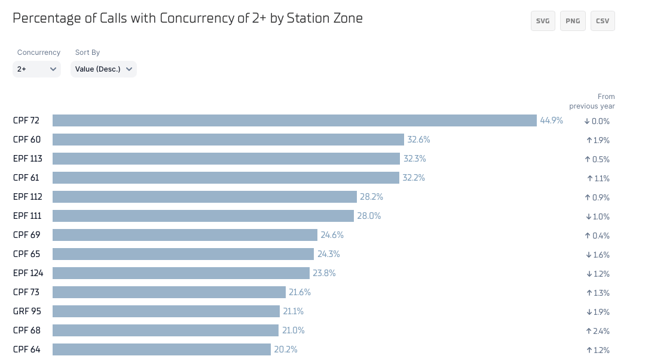
The second chart allows you to compare concurrency level across station zones using a customizable threshold. For example, the chart above shows that 45% of calls in station zone CPF 72 have concurrency of at least 2, while only 33% of calls in station zone CPF 60 have a similar level of concurrency.
Use the Concurrency select menu to set a higher concurrency level as the threshold for comparison.